Studio Brief 01 - What is visual literacy?
| Module ID: | OUGD404 | Module Brief: | |
| Module Leader: | Amber Smith | Module Deadline: | 22/04/2014 |
| Module Tutor: | Simon Harrison | ||
| Brief Deadline: | 22/04/2014 | Outcomes Assessed: | A45, AB4, AC5, AD4 |
Studio Brief
You will be introduced to a range of fundamental Design Principles including the anatomy of type, colour theory, frame & format, Type and Grid all of which will inform your emerging understanding of the building blocks of Graphic Design.
Using these sessions and the related tasks as a starting point , develop an increasingly independent investigation into the principles that are introduced. You should document and evaluate your practical research thoroughly on your Studio Practice Blog. |
Background / Considerations
| All that is necessary for any language to exist is an agreement amongst a group of people that one thing will stand for another. In order to understand that language all members of that group must learn the principles, vocabulary and grammar in order to use and understand it. Visual language provides the visual vocabulary for graphic design. As with all languages it is based on principles and rules which need to be understood in order to effectively communicate ideas, concepts and messages. |
Mandatory Requirements
| All practical development and investigation should be documented on your Studio Practice blog and labeled OUGD404 plus the relevant task number. Any research in to contextual references relating to sessions, tasks and briefs should be posted to your Studio Practice blog and labelled OUGD404 plus the relevant task number (where necessary).. |
Deliverables
A body of work produced in response to set tasks documented on your Studio blogs.Evidence of independent investigation into Design principles of Type, Image, Layout, Composition and Colour as briefed.Resolutions to set tasks.
My understanding of this brief is that we were to start week by week completing certain different tasks of which by completion would help up to improve our understanding of different fundamentals of design that we should be comfortable with when designing and by using these sessions as our starting point we should begin to further our understanding into these principles and fundamentals through practical learning.
COMBINING LETTERFORMS
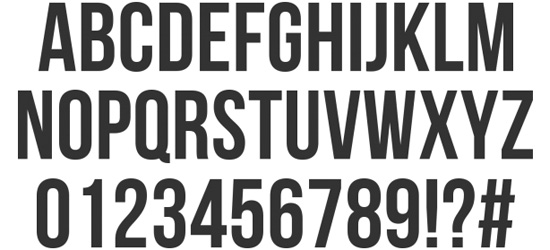 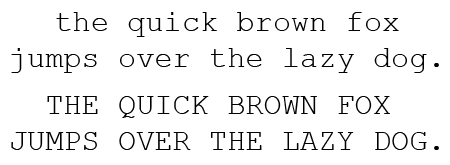 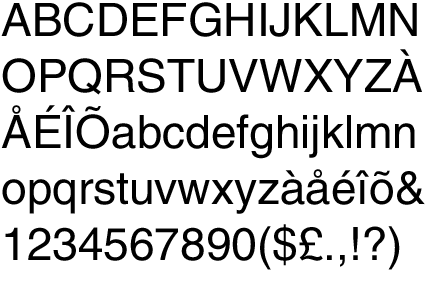
When we got to the lesson we were told that we had to pick one letterform from one of the fonts and use that one. I chose to use the j from courier. We were then told describe the letterform you have chosen and then write a lonely hearts add based around this with the characteristics you believe the letter has and then do a section for the type of letterform we were looking for in a mate.
My descriptions was "My name is j from courier. I am simplistic yet effective, very easy to get along with and overall just fun and playful. I am looking for someone sleek yet bold in character, straight forward and elegant"
We were then told to stick our lonely hearts adds on the wall and during the break look through them all and find someone who matched your description. After the break it came together quite nicely and me and someone else both picked each others letters as the descriptive adds for who we were looking for worked both ways. We were asked to pair up and by combining the two letterforms of which we had chosen to make a brand new font that is a mix of the two.
Together we created Century-Courier and i believe it would work well as a regularly used font if it was finished and finalised.

The final thing we were asked to do was we were given the same word but wrote in two different fonts and we were asked to draw out connotation of the font through drawing a pictire of the word we were given. We were given the word house in these two different fonts;
 
This session had helped develop the way I look at and analyse things and helped me with an insight into looking at the connotations that a font can have.
HANGING LETTERFORMS
For the second design principles task we were given cardboard by the tutors and in small groups were asked to use it to create a suspended 3D letterform comprised of separate sections of the letterform suspended separately that when looked at from a side angle wouldn't look like a letterform at all but when viewed from a specific point through a viewfinder the pieces would come together and create the letterform. This would be similar to the concept used in a lot of channel 4 advertisements as seen below.
 
The only other specifics for the task were that we had to create the letterform through a minimum of four different shapes and that we would also have to build a viewfinder set back at a distance that it could be viewed from. So we firstly set out on the task by creating an A5 sized viewfinder in a cardboard box to view it through and set the viewfinder in place, away but facing the area where we would construct out letterform. As a group we decided that the letterform that we would use is the K from the font Braggadocio due to its geometric form and use of straight lines, as we though this would make he task easier as it eliminated the problem of curves.

Firstly when it came the the making of the letter we printed out the letter at a certain scale so that we could measure the lengths of the sides of the shape and therefore expand the size of the letter by ten perfectly so it would be an appropriate size but still be in scale with the original letterform. In the end after an attempt at separating the letter into five different pieces and trying to position it we had a problem with getting the letterform aligned so we eventually decided to use four different components to make up the letterform instead. Below are some pictures showing the process of us putting the parts of the letters together.
 
During the process of aligning all of the pieces of the letterforms we hit a few snags along the way, the first of these being that because of the fact we were hanging the pieces with string and tape we had trouble with the pieces of the letterform moving as the tape was giving way under the weight of the cardboard and it generally not being sticky enough meaning the parts of the letter were moving right and left without us doing it. We battled this by also adding a supporting string not only on the top of the letter but also on the bottom of the letter so that the letters would remain in place.

Another problem we hit along the way was the fact that when we created all of the pieces of the letterform to scale we didn't take into context the fact that and piece hung closer towards the viewing point would look bigger and anything further away from the viewpoint would look smaller that it should do and so then with a little alteration to the small triangle that was used for the letter and some re-aligning we had the letter basically finished! Along the way we hit a few problems that probably incurred through us not planning the letter enough due to the fact we were raring to set off creating the physical letter but as a whole these problems were solved and we worked well as a team.
 
As you can see from these final two images I believe we fully achieved the aim of the lesson as from the viewing point the letter comes together but from any other angle the shapes didn't come together and therefore the letterform became totally distorted.
At the end of this lesson we were put into groups and were told that we were to bring in five different objects of which were of a certain colour, the colour that I was given was yellow
THE COLOUR THEORY
For the third design principles task we were told to bring in five objects of which were a certain colour and the object that I brought in were all yellow, through the completion of this task we would begin to understand the thought process that surrounds the colour theory and its links to the primary colours ans the way this is also adapted into the secondary colours. Below are some images showing a range of different shade of yellow objects that were brought in between our group.
  
The next task that we had was to arrange the objects that we had brought in on a shade basis as we knew the lesson surrounded basis of the colour theory we decided that we should arrange the items on the basis of the colder most blue influenced yellows at one end of the spectrum and the warmer most red influenced colours at the other end of the spectrum, with the most neutral yellows in the centre. Below you can also see that we created almost a colour pallet by arranging the objects from darker warmers yellows at one end and the colder yellow colours at the other end.

The final past of this activity was that when the the groups had finessed organising the order of their own objects we all come together and organised the three colours as a whole putting the coldest yellows next to the coldest blues and etc... this came together to give us the colour wheel in the image below.

After a group discussion looking at this colour wheel helped me with the way I thought about how important the use of different tones of colours can be in relation to the primary colours and what the tone of these colours can represent namely a warm or cold connotation. It also helped me with the envisioning of where the secondary colours such as green, purple and orange come from by looking at the relationship where the different colours came together.
RE-DESIGNING THE FIRE EXIT SIGN
For this weeks design principles lesson we were given a task by John our tutor to redesign the famous fire exit symbol designed by Yukio Ota as this would help us to think about the use of symbols and icons in graphic design. Below is a picture of the existing fire exit sign.
 
To begin this task we started off by getting into group and quickly mind-mapping different changes we could make to adapt and possibly totally change the existing symbol. After doing this with our ideas set about way that we could adapt the sign we set away separately quickly drawing out own idea that we had and after we had finished designing separately we would come together and vote on which idea we thought was the best and then would take this idea further. Below the first image you see in the ideas that I generated and below the first image the ideas of some of my other team mates.
    
After coming together and discussing some of the different ideas members of the group had come up with we found there had been a very wide range of different avenue that people had gone down in this idea generation stage some of these taking a more comedic route, some of these being a total redesign taking on no aspects of the old sign and some of these being an almost re-work of the old design to give it a more modern look. After the discussion about our favourite as a group we had decided that the fact that the original symbol itself is one of he most successful icons/symbols ever decided that we would go with an idea of which was almost a regeneration of the old logo and therefore my design below was picked. After this we took the original drawing into the computer through scanning it in and then digitalised it by using illustrator to create our final design.
 
This task gave us an insight into the world of iconography and how minimal words and symbols can tell you a lot such as in a fire exit sign and an insight into how hard it can be to redesign such a successful pre-existing sign. Another thing that we learnt through the final discussion of the lesson was that in this modern age the use of our advancements in technology should be thought about and used such as a moving image animation or advancements in luminous paint so it would glow in the dark. This made me think about how the world is changing and how these changes in the world can be used and incorporated into the world of graphic design.
NEGATIVE SPACE
Task: After looking at the examples of 'negative space' both in typographic terms and even in photographic terms the workshop is to choose a word i.e. HALT (Typographic) Upper or lower case and what what element you can add to use with or replacing the identified space to create and image suggested by the chosen word/element. Within the time available, you may render this in any way you choose, if you wish to Mac up, and you feel you have time, go for it otherwise by hand if it suits you as a creative. Work A3/A4.
For the final workshop of this brief of design principles we started the lesson by thinking about the use of negative space. Negative space is the area in between shapes and text that to an extent can be used to display somewhat of a hidden meaning. Below are two very famous examples of this, firstly as you can see in the FedEx logo below there is a hidden arrow that as been created between the e and the x of the logo. This shows such a small change to something like the kerning can create some wonderful negative space.

The next example isn't one that was created by playing with text but for a design idea, this logo is the logo for The American Institute of Architects Centre and they have worked in a use of negative space to create a cityscape where the grooves in the key would usually be so that the logo better represents them. This is an example to where a small change to the design can have a very strong impact on the logo.

The final example i have Is an artist called Noma Bar, this example is an example of negative space not being used in the usual sense in a logo through minor adaptations but Noma uses negative space in his graphic design to give his artwork more depth to the meaning of it, without spelling it out for the viewer. This use of negative space adds an almost mysterious side to the artwork.
 
So I therefore started off creating some of my own examples by quickly drawing out some ideas I had and above you can see my first design sheet with all my ideas on it. Firstly ironically I thought i would start with the words Negative space themselves, trying to add a small element os the use of negative space to each word that ties in to the respective words, I included a minus symbol into the word negative and a planet symbol into the negative space of the word space. I then continued to do this with other words that cam into my head tying in a sand timer into the word time, a guitar headstock into the word music and lightbulbs in the counters of the words light and energy and finally a wave shape into aspects of the word wave. Then I thought I would go away from making the negative space out of the exiting letter and making it work myself so similarly to the example above with the architects centre I included a cityscape into the word home to add depth to the word and finally had an attempt of using negative space into a symbol or piece of design, you can see that in the silhouette of the trigger space in gun shape I have included a man's face crying, i hoped this would be subtle but powerful when seen by the viewer.
 This lesson made me think deeply about how important the use of negative space can be so used effectively to add massive impact and a depth of meaning to a piece of text or design without it being overly in the face of the viewer. |


No comments:
Post a Comment